Situation
I forgot my password and can't log in.
If you entered your password several times incorrectly and your account is locked, follow these steps to unlock your account.
What to do
Here are the steps on how to reset your Movio account password.
These steps can only be completed by a user with the ’Administrator’ account type.
- Hover over ‘Admin’ in the top menu
- Click on ‘User Accounts’ under the ‘Manage’ header
- Search for the relevant account and click on it
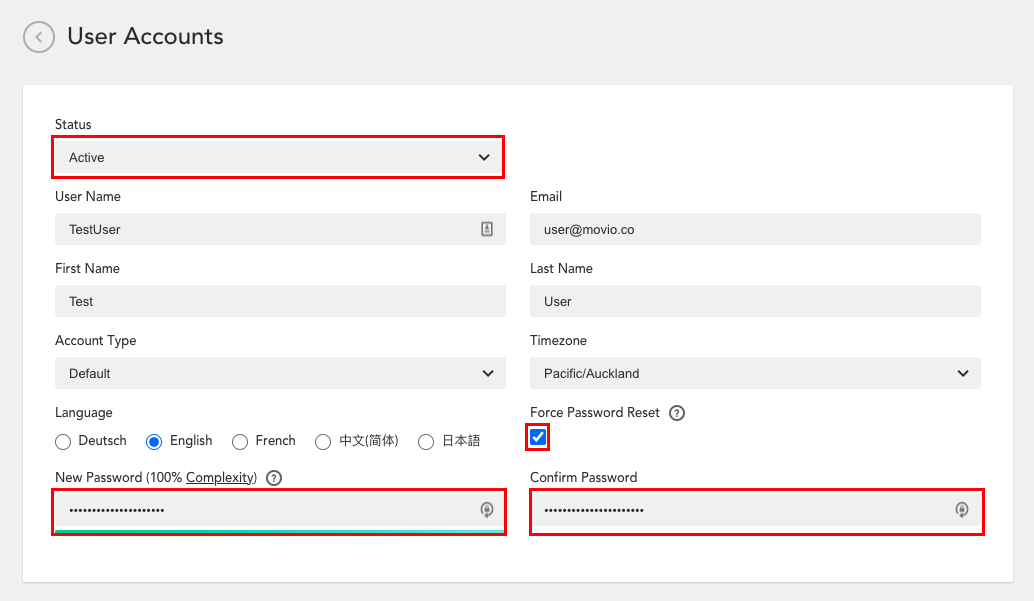
- Verify that the Status is set to 'Active'
- Set a new password for the user
- Tick the 'Force Password Reset' so that the user is required to update their password the first time they log back in
The user is now able to log in with their new password set in step 5.
Please submit a request if you continue to have issues.
Comments
0 comments
Article is closed for comments.