Find here a collection of most frequently asked questions around Movio Metrics, the new reporting tool in Movio Cinema.
Are there new data points in Movio Metrics that are not currently available in the Movio Cinema console?
Yes, there are a number of new data points that were previously unavailable or cumbersome to calculate. For example:
- Average revenue breakdown by active, contactable, and contacted members
- Churned and re-activated members
- RFM tracking
These are just the additions for the first release and more metrics will be added over time. A key benefit is that Metrics is a combination of relevant information which is available in a single place.
Is Metrics replacing the standard campaign reporting?
No, the purpose of Movio Metrics is to provide higher-level reporting of loyalty programs and their impact on moviegoer behavior.
Will current reporting be deprecated?
No reporting will be deprecated as part of the Movio Metrics launch but there are plans to deprecate aspects of our higher-level reporting in the future (e.g. Marketing Dashboard).
How often is the data updated?
We’re currently updating data on a daily basis. This will be more frequent in the future pending some internal data improvements.
What is a Visit?
A Visit is a collection of all the transactions a moviegoer makes for a particular session date. This helps to better understand what a moviegoer does when they visit your cinema.
Here are a few examples of a Visit:
- Sebastian purchases a ticket on Monday for a Friday session of Star Wars. On Friday, he purchases a popcorn and soft drink. All these transactions are grouped together as a Visit
- Michelle purchases a ticket on Saturday morning for an afternoon session. At the cinema, she purchases another ticket for a friend, along with two ice-creams. These transactions are grouped together as a Visit
- If David watches two movies in one day, all transactions to both of these movies will be counted as one Visit
Is the Revenue tab based on Transactions or Visits?
Movio defines Transactions and Visits as separate terms.
The Revenue tab in the Movio Metrics dashboard is built on transactions within the selected period. The Visits metric is calculated off the transactions captured by the filters.
How are the cinema filters applied to each tab?
Overview Tab
- Active members / Active Contacted / Membership Base Section: Shows members whose most frequented cinema is part of the selected cinema(s)
- Admissions / Total Revenue / Revenue Section: Shows transactions from the selected cinema(s)
- Communications: Shows communications sent to members whose most frequented cinema is part of the selected cinema(s)
Revenue Tab
Shows transactions from the selected cinema(s)
Membership Tab
Shows members whose most frequented cinema is part of the selected cinema tag(s)
Can I filter on custom values or groups?
This is currently not available, however, we intend to add full filter integration between the dashboard and moviegoer groups created in our segmentation tools (e.g. Group Builder) in the future. Our goal was to release Movio Metrics to our clients as early as possible so that we could focus on the collaborative conversation around future direction.
How do benchmarks work?
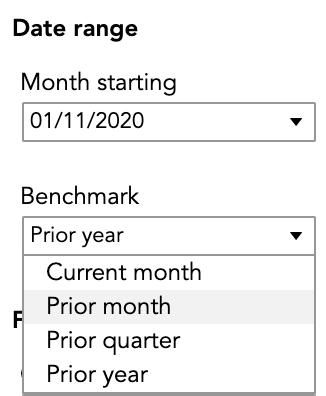
Benchmarks are available on pages that allow filtering by month. The benchmarks display the relative changes in a particular metric between the month selected and the month that was X months ago. X is defined as the selected benchmark.
In the below example, the benchmark will show the relative change in metrics for the month starting 01/11/2020 in comparison to the value in the month ending 01/10/2020.
For pages that allow filtering by start/end dates (Revenue and Communications tab), the benchmarks display the relative changes in a particular metric between the aggregated values in the time period between the start and end date with aggregated values in the time period between the start date minus the benchmark value and end date minus benchmark value.
For example, in the below screenshot, the benchmark will show the relative change in metrics for the period between 01/10/2020 and 31/10/2020 with the period between 01/10/2020 minus 30 days and 31/10/2020 minus 30 days.
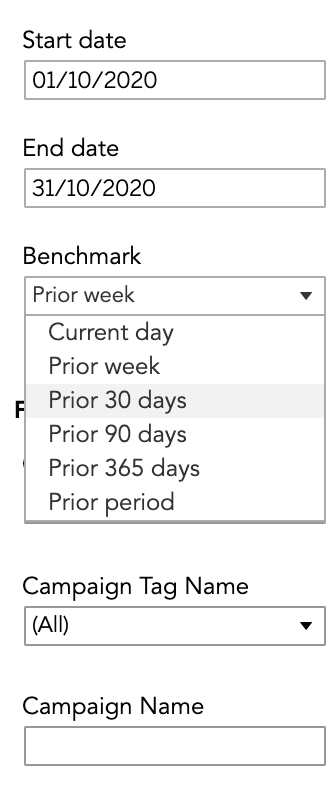
The ‘Prior period’ benchmark option calculates the number of days between the start date and end date (e.g. in this case it will be 30) and looks at the same number of days leading up to the start date.
For example, if the start and end dates are between 01/10/2020 and 05/10/2020 the benchmark period would be the 5 days leading up to 01/10/2020.
Why are some tabs filterable on months and some on a date range?
The difference between the tabs filterable by months and tabs filterable by date range primarily comes down to the level of observation that is meaningful to a given data point.
Transactions and communications occur daily, therefore, the respective Revenue and Communications tabs can see significant changes on a daily or weekly basis depending on films being released or communications being sent. For this reason, the tabs are both filterable on date ranges.
However, metrics such as Active member counts, RFM metrics, and new/reactivated/churned member counts all change slowly and are better observed in larger time intervals.
Is the RFM median the same that is used in Insights?
The RFM calculation has been adjusted slightly from its first use. Movie Insights and Audience Insights both use the median to determine the high/low groups. Movio Metrics uses the mean.
What campaign channels will be included in the Communications tab?
The Communications tab will only include Email and SMS campaigns sent in the selected month, including loyalty campaigns as well as one off/recurring campaigns. It currently does not include automated campaigns.
Are subscription categories accounted for in contactable?
We realise this impacts some exhibitors who have non-standard setups with their subscriptions. We are looking into the best way to alleviate this.
How does Movio Metrics decide on 'The Top campaigns' in the Communications tab?
'The top campaigns' list is currently decided by the combination of the filters applied by the user and then sorted by open rate, with the top ten campaigns being shown.
For more details also read Understand Movio Metrics definitions and Using Movio Metrics.
Comments
0 comments
Article is closed for comments.