Movio Cinema offers the ability to generate dynamic functionality within your email header and body using Conditional Content. You may wish to define what a member can view in their email based on their member information, such as:
- Gender
- Age
- Loyalty club
- Loyalty points balance
- Loyalty tier
- Favourite cinema (supports tags)
- Most frequented cinema (supports tags)
- Preferred cinema
- Preferred cinema concept
- Manual profile preference
- First name
- Last name
- State (geographical)
If any of the fields above are not available in your console, please submit a request with Movio support. The definition of each field is available on the Filter Definition Guide.
If you would like the header (From name, subject line and preheader) or content of your email to change depending on the member receiving it, you would use Conditional Content.
For example, all males in your target group will receive the ‘Fast 8’ promotion and the ‘Pirates of the Caribbean’ presale information whereas all females in your target group will receive the ‘Fast 8’ promotion and the ‘Baywatch’ presale information.
Note that when 'Favourite Cinema' is used in the Conditional Content but a member doesn't have a favourite cinema associated to their account, it will fall back to the member’s preferred cinema.
Use Cases
There are many reasons why you would want to use Conditional Content for your emails.
- As a marketer, you may want to invite gold tier members to a special sneak peek screening by using your subscription club as the From name in Conditional Content but use your loyalty sender name for the rest of your audience
-
As a marketer, you may want members of a certain cinema to see specific content that is not available at another cinema site. For example, you may want members who frequent Cinema A and Cinema B to see a new film opening, however, members of Cinema C only see art-house content.
Or you may want to group cinemas together, using Cinema Tags, based on their location
- When only 'Most Frequented Cinema' is used in the Conditional Content and the member hasn't transacted, the member will be included in the 'Everyone else' condition for that section
- As a marketer, you want those who identify their gender as ‘female’ to display the latest ‘chick-flick’ and those who identify their gender as ‘male’ to see the latest action film
-
As a marketer, you want those members whose point balance qualifies them in the Platinum tier to receive information of a secret screening. Those in the lower tiers should be informed that they may purchase tickets to the same screening
Configure Conditional Content
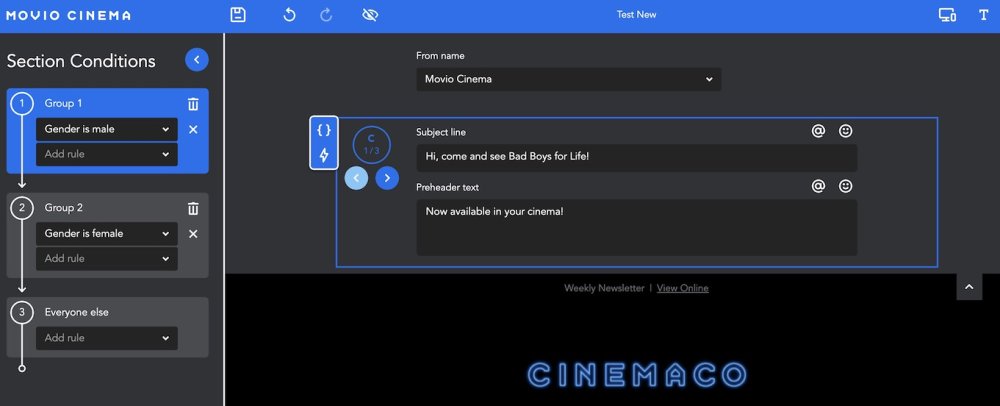
It’s very easy to set up your Conditional Content in Movio Cinema’s Email Editor. You can use Conditional Content for From name, subject line and preheader.
- Click on the blue box around any section you wish to add Conditional Content to
- An editing box will appear on the left where you can add ‘rules’
- Enter your rules into the spaces available
- You can then view your Conditional Content by either clicking on the ‘rule’ boxes, or by clicking on the arrows next to your sections
You can see an example below:
Comments
0 comments
Article is closed for comments.