Subgroups are very easy to create using your Group Builder filters.
Mixing ‘And’ and ‘Or’ statements together in the same group should be avoided. If you are configuring your statements in this way, it usually indicates the need for a subgroup.
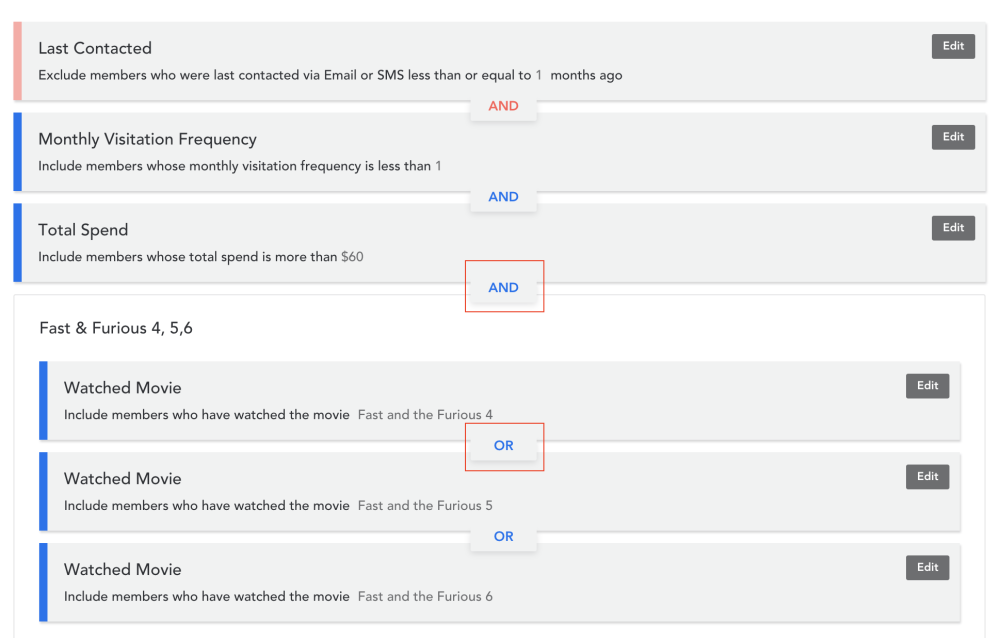
For this example, we will be looking at the following group:
Members who have watched either Fast & Furious 4, 5, OR 6, who are high spend, low frequency cinemagoers who were last contacted via email or SMS less than 1 month or 1 month ago.
- To create a subgroup, simply drag one activated filter over another.
For example, drag all ‘Watched Movie’ filters into their own subgroup and then select the ‘Or’ statement for the movies. This will return members who were last contacted via email or SMS less than 1 month or 1 month ago, low frequency, spend over $60 per visit, who have seen either Fast & Furious 4, 5, or 6.
- You can also click on the ‘Unnamed’ grey bar of your subgroup to give it a title.
Comments
0 comments
Article is closed for comments.