Situation
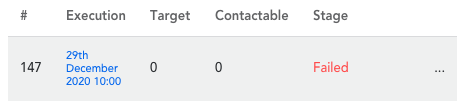
A recurring campaign execution might fail if no members are returned when the snapshot is calculated:
What to do
To access the campaign execution page:
- Hover over ‘Engage’ in the top menu and click on ‘Campaigns’ under the ‘Engage’ header
- Click on ‘Deployed' to show the recurring campaigns
- In the 'Executions' tab, you are able to see the history of all past executions for a chosen recurring campaign
The 'Stage' column shows 'Failed' if there were no members returned for the execution of the snapshot for that day. For example, if the snapshot captured members whose 'birthday is today' but there are no members with their birthday on the day of the execution.
If you believe there should have been members contacted in the failed execution, please review the snapshot used by the recurring campaign and make sure the filters are configured as per your intended use case.
Please contact us if the filters look correct and you believe members should have been contacted.
Comments
0 comments
Article is closed for comments.